


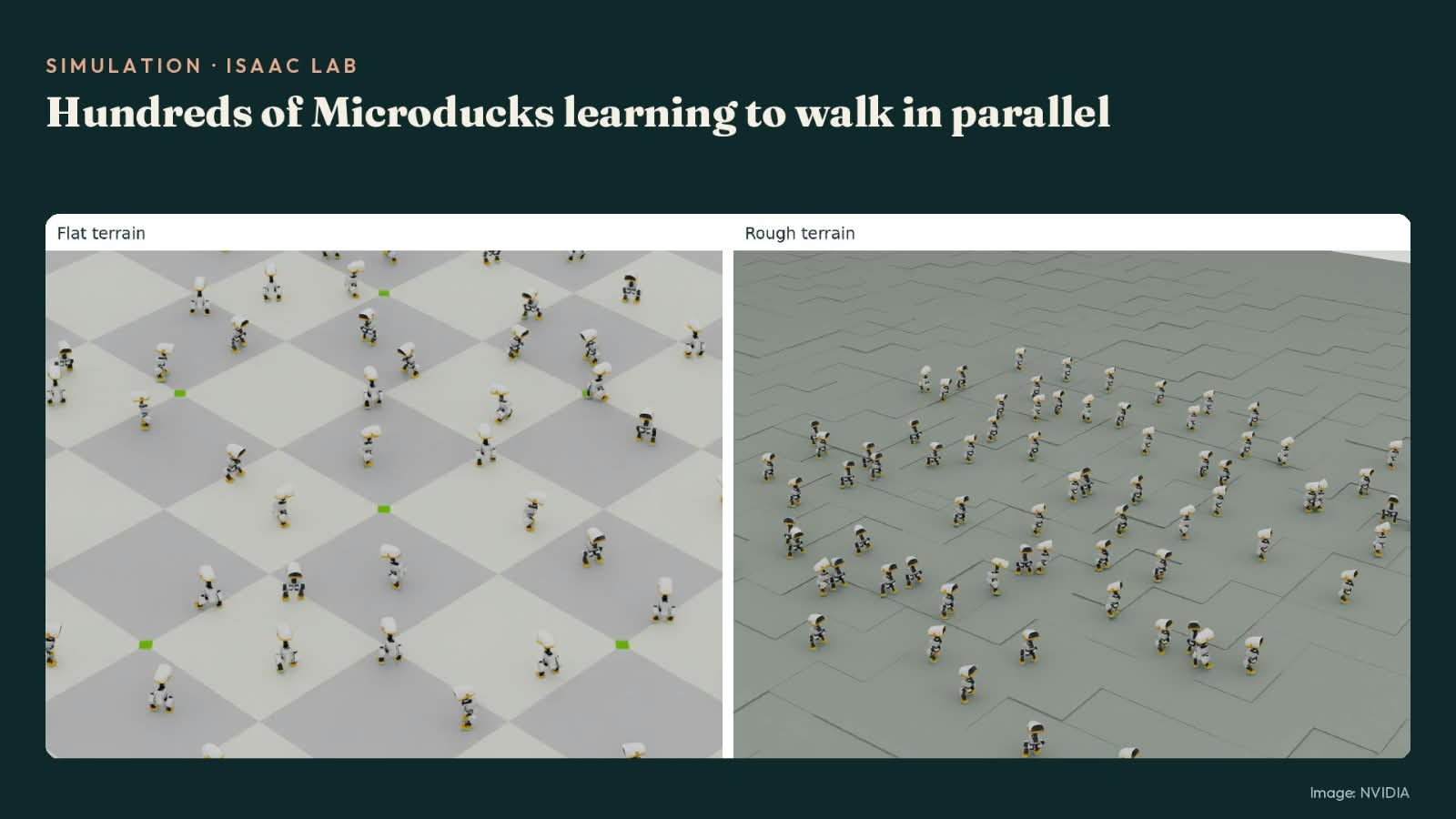
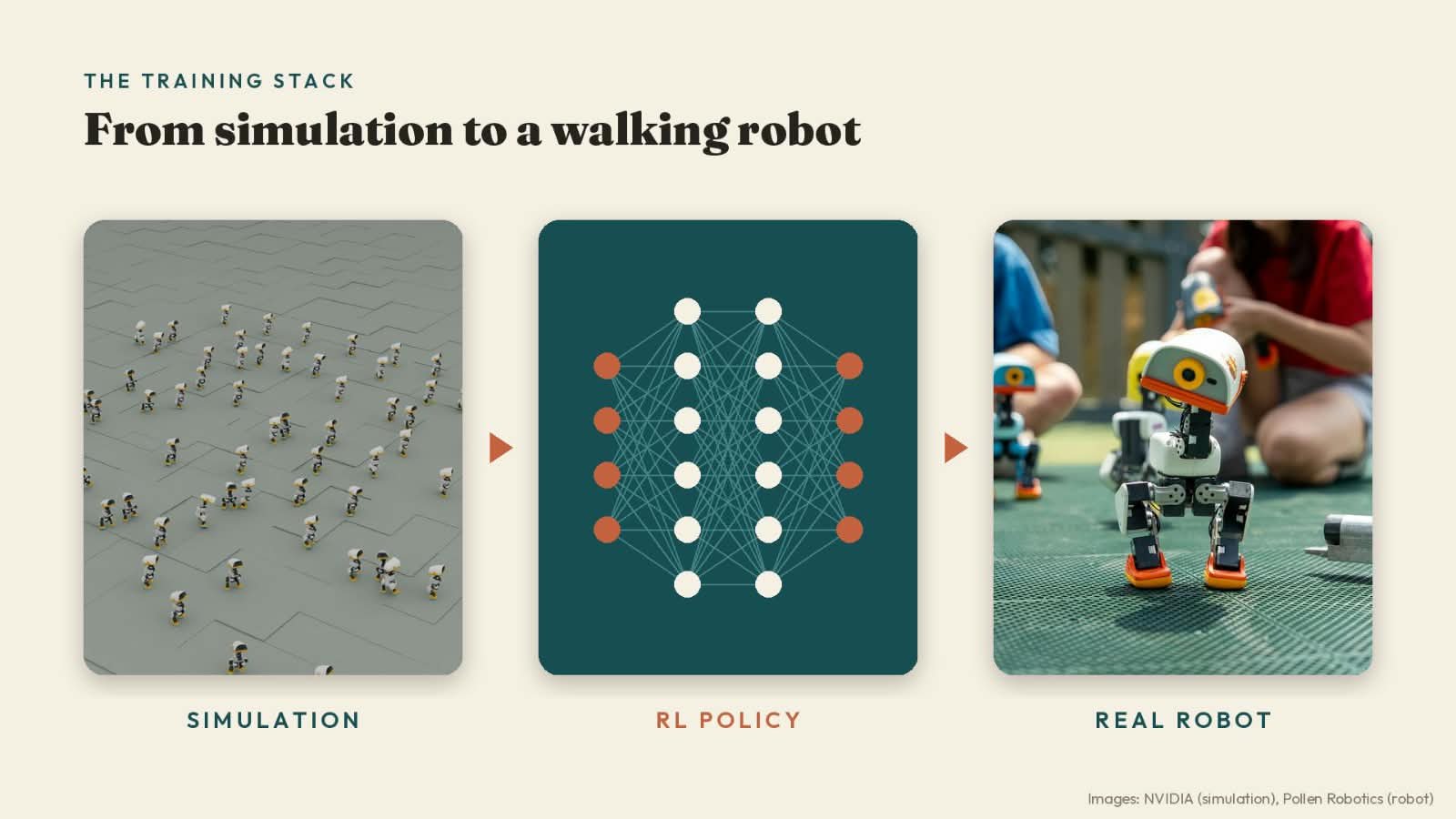
How NVIDIA Microduck learns to walk is the most interesting thing about it, because nobody sat down and programmed its steps. There is no line of code anywhere that says “lift left foot, swing, place.” Instead, the little duck practised in a physics simulation — falling over thousands of times, getting a score for every attempt, and slowly figuring out balance on its own. Then that learned behaviour, a single file, was loaded into the real robot.
In this article
- Microduck at a glance
- How NVIDIA Microduck learns to walk, step by step
- Two official ways to train it
- The unglamorous secret: modelling the motors honestly
- From simulation to the real duck
- When AI agents build the training course
- Train your own Microduck — without owning one
- So — is it open source? And can you build one?
- The DIY route: Open Duck Mini
- Our verdict
- How we researched this article
- Frequently asked questions
- Article updates
The duck itself is Microduck, a 25 cm bipedal robot from Pollen Robotics, the Bordeaux team that joined Hugging Face in April 2025. It became briefly famous on 21 October 2026, when NVIDIA’s Jensen Huang brought four of them on stage at GTC Berlin and had them sit, stand and take a nap on command. But the stage moment is the least interesting part. The interesting part is that the entire training stack behind those tricks is public — and you can run it yourself, free, without owning the robot.
The short answer to how NVIDIA Microduck learns to walk: it is trained, not programmed — through reinforcement learning in MuJoCo, a physics simulator. Thousands of simulated ducks train in parallel on a graphics card, the best behaviour is exported as an ONNX policy file, and the robot’s software swaps that file in and runs it 50 times a second. Pollen Robotics publishes the robot software, the simulation and the full training code on GitHub under the Apache-2.0 licence. The hardware, though, is not open source — more on that below, because it decides whether you can build one yourself.
A note on links and prices: this article contains no affiliate links. Prices are Pollen Robotics’ own listed prices, checked on the official product page on 29 October 2026.
Microduck at a glance
| Price | $399 — in Pollen’s words, “introductory price, before taxes and shipping” (official product page) |
| Size and weight | 25 cm tall, 14 cm wide, under 800 g |
| Motors | 15 degrees of freedom across legs, head and neck |
| Sensors | Front camera, an 8×8 time-of-flight depth sensor (Pollen calls it a compact LiDAR), 2 IMUs — one in the body, one in the head |
| Computer | Rockchip RK3566 with AI accelerator, 1 GB RAM, 32 GB storage |
| Battery | Removable NP-F550 camera battery, 2,600 mAh, “around one hour of runtime depending on use” |
| In the box | Robot, battery, USB-C cable, game controller — and 7 trained moves |
| Colours | Cream, Graphite, Lavender and Sky |
| Shipping | Pre-orders opened 27 August 2026; Pollen targets first deliveries before Christmas 2026 in North America and Europe — check the product page for the estimate on new orders, because it changes |
Specifications are from Pollen’s official press kit. Pollen itself warns that a few details — camera resolution and field of view, LiDAR range, radio versions — are “still being finalised,” so treat those as provisional.
How NVIDIA Microduck learns to walk, step by step
Reinforcement learning sounds complicated, but the loop is simple enough to explain to a child — which is fitting, given the robot.
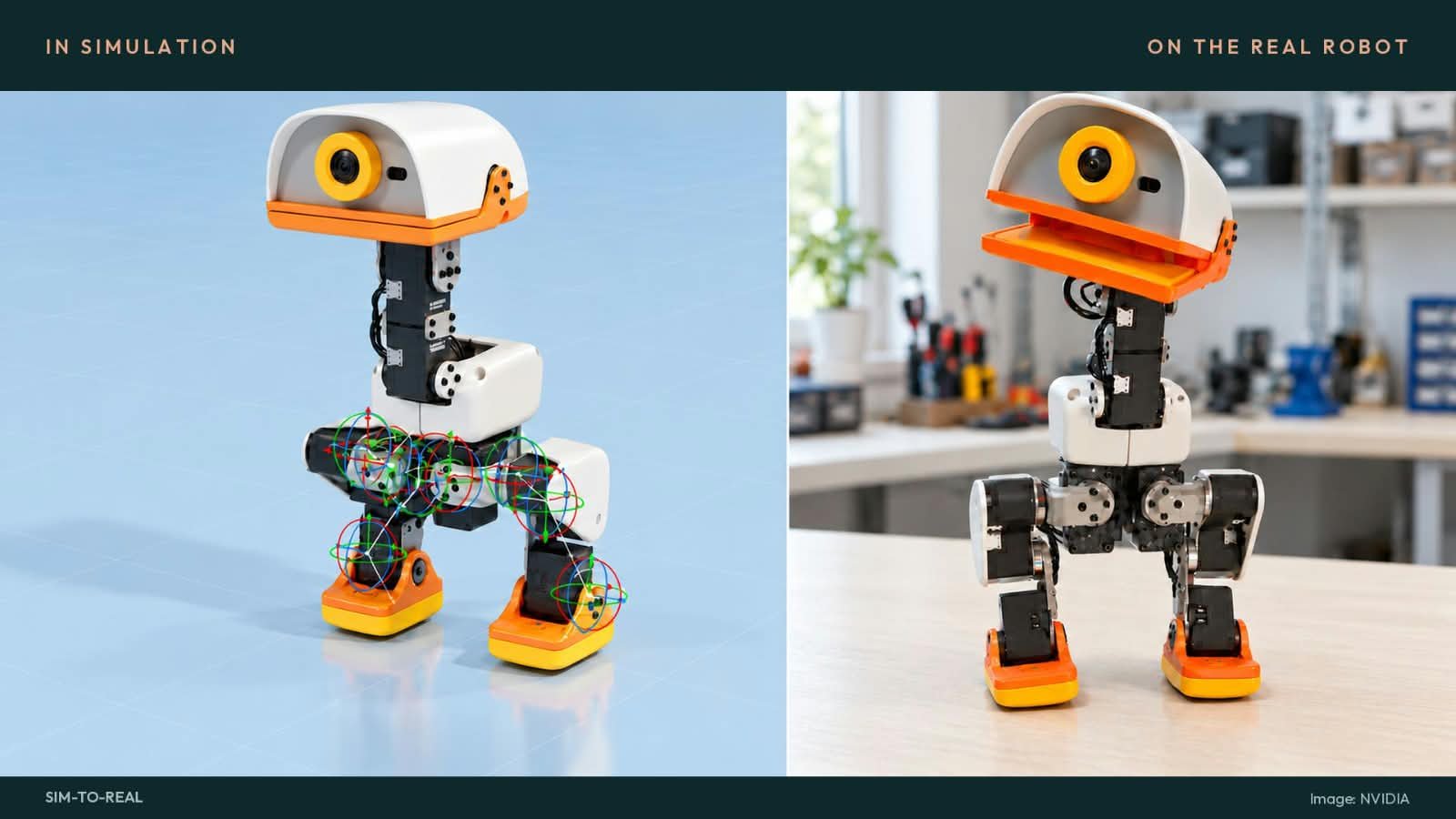
1. Build a copy of the duck inside a computer. Pollen’s simulation uses a digital Microduck with the same joint layout as the real one. The policy — the “brain” — reads 61 numbers about the robot’s state (joint positions, body tilt, the velocity and head pose it has been asked for) and answers with target positions for the servo joints, 50 times a second.
2. Let it fail, at scale. Instead of one duck, the trainer runs thousands of copies at once — Pollen’s standard walking setup uses 4,096 simulated ducks in parallel. Each one wobbles, falls, face-plants. A scoring function (the “reward”) gives points for moving at the requested speed, staying upright and moving smoothly, and takes points away for falling or wasting energy. The training algorithm — PPO, a well-known reinforcement learning method — nudges the policy a little after every batch of attempts, in whatever direction scored better.
3. Repeat until falling becomes rare. Pollen’s README estimates roughly one to two hours of training on a CUDA graphics card for “a usable gait” at 4,096 environments. The duck in the simulator walks, gets pushed, walks on slopes, recovers — millions of small experiences no real robot could survive collecting in the physical world.
4. Export the brain as one file. The trained policy is exported to ONNX, a standard format for neural networks, and copied onto the robot. The robot’s own software — written in Rust, split into small services for the control loop, updates, Wi-Fi, the gamepad, the camera and the depth sensor — loads the file and runs it. Walking, recovery and tricks are separate policies that the runtime hot-swaps behind the same 61-number interface.
That is the whole trick. Everything else in this article is about making step 2 honest — because a policy that walks beautifully in a perfect simulation usually falls flat on a real floor, and closing that gap is where the real engineering lives.
Two official ways to train it
Unusually, there are two documented training routes, both official, both free. Pollen maintains its own; NVIDIA and Hugging Face published a second one during GTC Berlin week.
| Pollen’s route | NVIDIA + Hugging Face route | |
|---|---|---|
| Repository / guide | pollen-robotics/microduck_rl on GitHub | Sim-to-real tutorial on the Hugging Face blog, using Isaac Lab |
| Framework | mjlab, built on MuJoCo Warp | Isaac Lab with the Newton physics engine |
| Algorithm | PPO (stated in the repo) | RSL-RL library (the tutorial names the library, not the algorithm) |
| What you need | A computer with a CUDA GPU — or no GPU at all: add --hf-jobs and the run happens on Hugging Face Jobs | A Linux workstation with a supported NVIDIA GPU and driver |
| Train command | uv run train Mjlab-Velocity-Flat-MicroDuck --env.scene.num-envs 4096 | uv run isaaclab train --rl_library rsl_rl --task IsaacContrib-Velocity-Rough-MicroDuck --num_envs 4096 presets=backlash |
| Better for | The exact recipe Pollen ships — this is the repo the product’s own behaviours come from | People already in NVIDIA’s Isaac ecosystem, or who want the agent-designed obstacle-course workflow below |
Both routes end at the same place: a policy.onnx file in the format the robot loads. That shared contract — 61 observations in, joint targets out — is also what makes policies portable between owners, which matters later in this article.
The unglamorous secret: modelling the motors honestly
Here is the part most coverage skips, and it is the part that decides whether sim-to-real works at all. In Pollen’s own words from the training repo: “At this scale — tiny servos driving a ~800 g biped — actuator fidelity is most of the sim2real gap, which is why the actuator is modeled down to its voltage control law instead of an ideal PD.”
In plain English: a cheap hobby servo is not a perfect motor. Its gears have play (backlash). Its strength sags as the shared battery drains. It answers commands a fraction late, and its friction changes with load. If the simulation pretends the motors are perfect, the policy learns to balance on precision it will never have on your desk — and falls.
So the training stack models the mess:
- A real actuator model. Every task uses the BAM M6 actuator model for the Dynamixel XL330 servo, simulating its voltage control law, back-EMF, and Coulomb, Stribeck and load-dependent friction.
- Backlash twins. Each main task has a “Backlash” variant that trains with ±1° of gear play (2° total) built into every servo joint — and the simulated encoders read through that play, exactly like the real ones do.
- Domain randomization. On every simulated duck, training randomizes mass and centre of mass, ground friction, joint inertia, encoder offsets, battery voltage and voltage sag, command latency — plus varied terrain and random pushes. A policy that survives all of that has a chance on a real carpet.
One honest detail, because you’ll trip over it in the docs: Pollen’s product pages say 15 motors, while the training documentation consistently describes 14 servo joints in the policy (five per leg, four in the neck and head). Pollen’s pages don’t explain the difference yet. It doesn’t affect training — the policy contract is the 14 joints — but it’s worth knowing before you go counting in the repo.
From simulation to the real duck
Deployment is deliberately boring, which is a compliment. The Hugging Face tutorial spells out the exact sequence:
- Export. Run the export step, which produces the ONNX policy with the observation normalizer baked into the file. Pollen’s warning here is blunt: always deploy the ONNX produced by the export script, “never a hand-converted checkpoint, or the policy sees unnormalized observations at runtime.”
- Copy it to the robot. One
scpcommand sendspolicy.onnxto the duck over your network. - Load it — on the stand first. Support the robot on its stand, then
sudo robotctl policy load walkwith your file. The tutorial’s test order is standing, slow walking, turning, stopping — in that order, not a somersault first. - Watch and, if needed, retreat.
robotctl monitorshows what the robot is doing;robotctl policy reset walkrestores the known-good policy.
Don’t own a duck yet? The onboard-software repo ships scripts/duck-sim, which runs the real robot daemons against a simulated body in MuJoCo — so you can practise the whole deployment flow, stand and all, against a duck that doesn’t exist.
When AI agents build the training course
The second route has a stranger chapter. In an NVIDIA developer blog post from GTC Berlin week, AI agents — Hermes and NVIDIA Nemotron for planning, an agent called Astra for the building — take a plain-language prompt and construct an obstacle course for the duck: Astra directs FreeCAD to build the base geometry, then Blender for detail and materials, and assembles the scene in Isaac Sim. Assets can also come from the SimReady Central Library, a free library of more than 2,000 simulation-ready 3D objects. A walking policy pretrained in Isaac Lab’s Microduck environment then gets extra training on ramps and obstacles, using the head camera’s depth — in NVIDIA’s example run, across 4,096 parallel environments on an RTX PRO 6000 Blackwell workstation GPU.
If that sounds like science fiction, it is really just our AI agents guide applied to a new domain: agents that plan, use tools, and check results — except the “result” here is a robot that can climb a ramp. NVIDIA is clear about the boundary, though: the post covers everything “up to that point” — deployment onto real hardware is, in their words, outside its scope. The deploy steps above come from Pollen and Hugging Face, not from NVIDIA. For what agents deliver in ordinary businesses, see 12 ways AI agents save small businesses time and money.
Train your own Microduck — without owning one
This is the part that makes Microduck different from every other cute robot launch: the learning loop is open to people who never buy one. New to the assistants behind these agents? Our best AI chatbot comparison covers ChatGPT, Claude and Gemini head to head.
- Start today, free. Clone Pollen’s microduck_rl, train the flat-ground walking task, export the ONNX, and test it on CPU. No CUDA card? The
--hf-jobsflag runs training on Hugging Face Jobs instead. - Go beyond walking. The repo’s task list reads like a duck’s bucket list: fall recovery (VelStand, StandUp), SitStand, GroundPick (touch the ground with the tip of the beak), BallKick (a 70 mm, 15 g ball), Roulade (a forward roll), and a family of roller-skating tasks.
- Publish your policy.
uv run publishpackages a policy for the Hugging Face Hub in exactly the shape the robot loads — onepolicy.onnxplus a manifest — and validates it first, refusing broken outputs. On a real duck, anyone can then install it withrobotctl policy add. - Compete in the Arena. Microduck Arena is a Hugging Face Space where compatible policies (61 observations, 14 actions, up to 64 MiB) are tested on shared challenges and compared on a leaderboard.
Our editorial opinion: this shared-policy ecosystem is the actual product. A $399 robot is a gadget; a $399 robot whose tricks are files that strangers can train, publish and rank is a platform — and platforms are where the interesting stuff happens.
So — is it open source? And can you build one?
Half of it is, and the half matters. Pollen’s product page puts it plainly: “The SDK, the simulation and the full RL training stack are on GitHub. What the robot runs is what you can read, fork and retrain.” The code in both main repositories — the onboard software (pollen-robotics/microduck) and the training stack — is licensed Apache-2.0, one of the most permissive licences there is. The 3D meshes inside the training repo carry a different licence, Creative Commons BY-NC-SA 4.0 — fine for learning, not for commercial reuse.
The hardware is a different story, and credit to Pollen for saying so themselves in their press kit: “The open-source statement covers the software stack. The mechanical and electronic design files are not, so please do not describe the robot as open-source hardware.”
Which answers the build question directly: no, you cannot build a Microduck from files, because there are no official CAD files or bill of materials to build from. It is sold assembled. What you can build is its brain — new walks, tricks and recoveries — and that is genuinely most of the fun.
The DIY route: Open Duck Mini
If your heart is set on printing and soldering a duck of your own, the door is still open — it’s just a different duck. Microduck’s DIY ancestor is Open Duck Mini, created by Antoine Pirrone — who also co-authored Hugging Face’s Microduck training tutorial — as, in the repo’s words, “a miniature version of the BDX Droid by Disney.” It is fully open source, hardware included:
| Microduck | Open Duck Mini v2 | |
|---|---|---|
| How you get it | Assembled, pre-order | You print and build it — CAD is a public Onshape document, with print and assembly guides in the repo |
| Height | 25 cm | About 42 cm with legs extended |
| Cost | $399 assembled | “The full BOM cost should be under $400” (repo’s own words — parts only, and you need a 3D printer) |
| Computer | Rockchip RK3566 | Raspberry Pi Zero 2 W, with a BNO055 IMU |
| Motors | 15 (14 in the training policy) | 14, documented motor by motor in the repo |
| Open source | Software only (Apache-2.0) | Software and hardware (Apache-2.0) |
| Training | mjlab/MuJoCo stack, ready-made tasks | Pre-trained ONNX walk policies included; the project is moving to MuJoCo Playground — and it uses Rhoban’s BAM actuator modelling, the same lineage as Microduck’s |
Same family, same philosophy, different weekend. Microduck is for people who want to train policies; Open Duck Mini is for people who also want to earn the robot.
Our verdict
If you want to learn robot reinforcement learning: start now, in simulation, for free. The repos, the tasks and the Arena are all live, and everything you learn transfers — MuJoCo, PPO, domain randomization and actuator modelling are the industry’s tools, not duck-specific trivia. Microduck is one of the more interesting AI tools of 2026 — see the wider field in our top 10 AI tools guide.
If you want the robot itself: the $399 introductory price is Pollen’s, the product is first-generation, and the honest caveats are a roughly one-hour battery and a shipping target — first deliveries before Christmas 2026 — that you should re-check on the product page before ordering, since preorder queues move. Nothing here is a reason not to buy; it’s a reason to buy with open eyes.
If you want to build hardware: Open Duck Mini, no contest. It’s the one with the files.
How we researched this article
Desk research only, and we’ll say so plainly: Microduck has not shipped to us and we have not trained a policy ourselves. Every factual claim above was checked on 29 October 2026 against primary sources — Pollen Robotics’ product page and press kit, the microduck and microduck_rl GitHub repositories, the Hugging Face sim-to-real tutorial, NVIDIA’s developer blog, and the Open Duck Mini repository — and quotes are reproduced verbatim from those pages. Where a claim is Pollen’s or NVIDIA’s (training-time estimates, the “under $400” BOM), we attribute it to them rather than presenting it as our own finding. Opinions are labelled as our editorial opinion where they appear.
Frequently asked questions
How does Microduck learn to walk?
Through reinforcement learning in a physics simulator. Thousands of simulated copies train in parallel in MuJoCo, scored for moving at the requested speed without falling; the resulting policy is exported as an ONNX file and loaded onto the real robot, which runs it 50 times a second. Nobody programs the steps themselves.
Is Microduck open source?
Its software is: the onboard robot software, the simulator and the full reinforcement-learning training stack are on GitHub under the Apache-2.0 licence. The hardware is not open source — Pollen has not released the mechanical or electronic design files and asks people not to call it open-source hardware.
Can I build a Microduck myself?
Not the product — there are no official build files, and it is sold assembled. You can build its behaviours (train and publish your own walking policies), and if you want a duck you physically build, Open Duck Mini is the fully open-source DIY project from the same lineage, with a parts bill the repo puts at under $400.
Do I need to own a Microduck to train it?
No. Pollen’s training repo runs on your own computer (or on Hugging Face Jobs), the onboard repo includes a simulator mode that runs the real robot software against a simulated body, and Microduck Arena lets you test policies on shared challenges — all before any hardware arrives.
What computer do I need for training?
For Pollen’s route, a CUDA-capable NVIDIA GPU — Pollen doesn’t publish a minimum model — or no local GPU at all if you use the --hf-jobs option. For the Isaac Lab route, the tutorial asks for a Linux workstation with a supported NVIDIA GPU and driver. Neither route publishes a minimum VRAM figure, so be wary of any site that invents one.
When does Microduck ship?
Pollen targets first deliveries before Christmas 2026, in North America and Europe at launch. Pre-orders opened on 27 August 2026 at the $399 introductory price. Check the official product page for the current estimate before ordering — queues have been long, and estimates move.
Article updates
- October 31, 2026 — Added internal links to our AI agents for small business guide, our top 10 AI tools guide, and our best AI chatbot comparison.
- 2026-10-29: Article published. All facts checked the same day on Pollen Robotics’ official product page and press kit, the microduck and microduck_rl GitHub repositories, the Hugging Face Isaac Lab sim-to-real tutorial, NVIDIA’s developer blog and the Open Duck Mini repository. The 15-motors vs 14-policy-joints difference in Pollen’s own documentation is noted in the article, as Pollen does not currently explain it.




[…] into the physical world: in October 2026, AI agents designed an obstacle course that taught a robot duck to walk in simulation, long before the policy ever ran on real […]
[…] How NVIDIA Microduck Learns to Walk: Inside Its Open-Source Training Stack […]